
1Introduction#
1.1What is the Aerospace Robotics Competition?#
The Aerospace Robotics Competition (ARC) is a high school drone competition offered by the non-profit organization STEM-ED INC. STEM-ED INC has the mission of providing hands-on, accessible, and relevant opportunities for students to encourage them to join STEM. This mission is accomplished through three major focus areas:
ARC is currently offered in 5 regions:
- Antelope Valley, CA: AntelopeValley@stemed.org
- New England: NewEngland@stemed.org
- Philadelphia, PA: Philadelphia@stemed.org
- Mid-Atlantic, VA: MidAtlantic@stemed.org
- San Diego, CA: SanDiego@stemed.org
- Other: Support@stemed.org
Each region consists of up to 30 teams, with volunteers providing local support and events. Regions with up to 18 teams will host a Saturday-only competition. Regions with 19-30 teams will host a 2-day competition from Friday through Saturday. Event schedules will be finalized and published after registration is closed.
The top 3 champions from each region will also be invited to the ARC National Championship. The National Championship rulebook is released approximately 30 days before the event, with further details distributed throughout the season.
1.2What are the Benefits of ARC?#
1.2.1For Students#
ARC seeks to ignite a passion for aerospace-related STEM work in high schools around the nation. The competition is built upon three pillars:
- Hands-on flying of unmanned aerial vehicles (UAVs)
- Developing knowledge of unmanned and autonomous systems
- Learning basic aerospace engineering principles
High school students thus gain valuable experience with hands-on designing, building, testing, and flying of quadcopter drones. They are encouraged to use the engineering process, complete independent research, and practice communication and teamwork skills.
1.2.2For Volunteers#
STEM-ED INC is 100% volunteer-operated, which supports the mission of an affordable competition. All volunteers are passionate about promoting accessible STEM opportunities to students of all backgrounds. ARC needs a wide variety of skill sets for these events to be possible, and volunteers are encouraged to learn and grow in any topics of interest.
Please contact your local region or Support@stemed.org if you are interested in receiving more information about supporting STEM-ED INC as a volunteer.
1.2.3For Sponsors#
Robotics events require an extensive list of supplies, which must be purchased with either team registration fees or sponsorships. As STEM-ED INC aims to provide an affordable event to all students, sponsorships are critical for reducing team participation costs and creating a fantastic competition experience. Donors can support STEM education in their community and nationwide by providing financial assistance through the registered 501(c)(3) non-profit organization STEM- ED INC.
Please contact your local region or Support@stemed.org if you are interested in receiving more information about supporting STEM-ED INC as a donor.
1.3Season Overview#
1.3.1Mission Background#
While drones are exciting and fun, there is a greater purpose to the skills learned through ARC. As the season progresses, challenges are focused on developing several areas of students’ lives.
Engineering:
- The engineering process develops vital critical thinking skills useful in all aspects of engineering and life.
- Hands-on skill development improves coordination, experience, and confidence in hands-on projects.
- Completing ARC challenges promotes creativity in designs, develops an understanding of successful structures, and boosts problem-solving abilities.
- Troubleshooting skills are important for all aspects of life, promoting a logical process of patiently working through issues to find a solution.
Drones:
- Since drones are a growing technology with a wide variety of functions, students develop an understanding of real-world problems and solutions through getting hands-on experience with cutting edge technology.
- ARC challenges are related to positive applications of drones, giving students the opportunity to ponder the humanitarian benefits of their skills.
Communication:
- Teamwork is required for all engineering roles, so ARC provides challenges which encourage teamwork for success.
- No matter how impressive a design is, if the engineer cannot communicate properly, the design cannot be used. ARC requires both verbal and written communication, so students build these critical skills through practice.
Ethics:
- Ethics is central to the competition, guided by STEM-ED’s core values of Integrity, Excellence, and Respect. Volunteers and students are expected to uphold these principles throughout the event.
- STEM-ED has partnered with the Saint Anselm College Center for Ethics in Society to illuminate the need for students to consider the ethical implementation of technology development.
- Through humanitarian challenges, students learn to apply their skills to improving the world.
- ARC prioritizes safety, urging teams to consider the well-being of others, including opponents and spectators, rather than solely focusing on winning.
- Humility and admitting mistakes are vital for engineers to prevent dangerous, costly errors. ARC fosters a supportive environment in which students feel safe asking questions and seeking help.
1.3.2Rulebook Overview#
We are excited to have you join us for the 2025 Aerospace Robotics Competition! Jumping into this competition may be daunting, so we want to ensure you have all the resources needed for success.
This rulebook is large, but it is full of important information for teams to reference throughout the season. We highly recommend you read through the entire rulebook at least once, getting familiar with the requirements and noting any questions you may have. We also recommend printing a copy for your team to have on hand during meetings.
Once you have read the entire rulebook, the Table of Contents will be a useful tool for you to return to key sections as needed. We will also be releasing specific smaller documents, including:
- 2024-25 Field Kit Assembly Guide
- 2024-25 Safety and FAA Compliance Guide
- Scoring calculation sheet
- Sample budget and schedule spreadsheets
- Sample Technical Presentation slides
Please see stemed.org/arc to find these documents as they are released.
If you have any questions about the rulebook, you are always welcome to contact Support@stemed.org for assistance. We look forward to a great season!
Sincerely,
STEM-ED INC Volunteers Support@stemed.org
2Competition Overview#
2.1Competition Venue#
Each ARC competition venue will use standardized specifications for safety and field setup, which will be described further in this section. Teams must be sure to learn all safety requirements and follow volunteer instructions for a successful event.
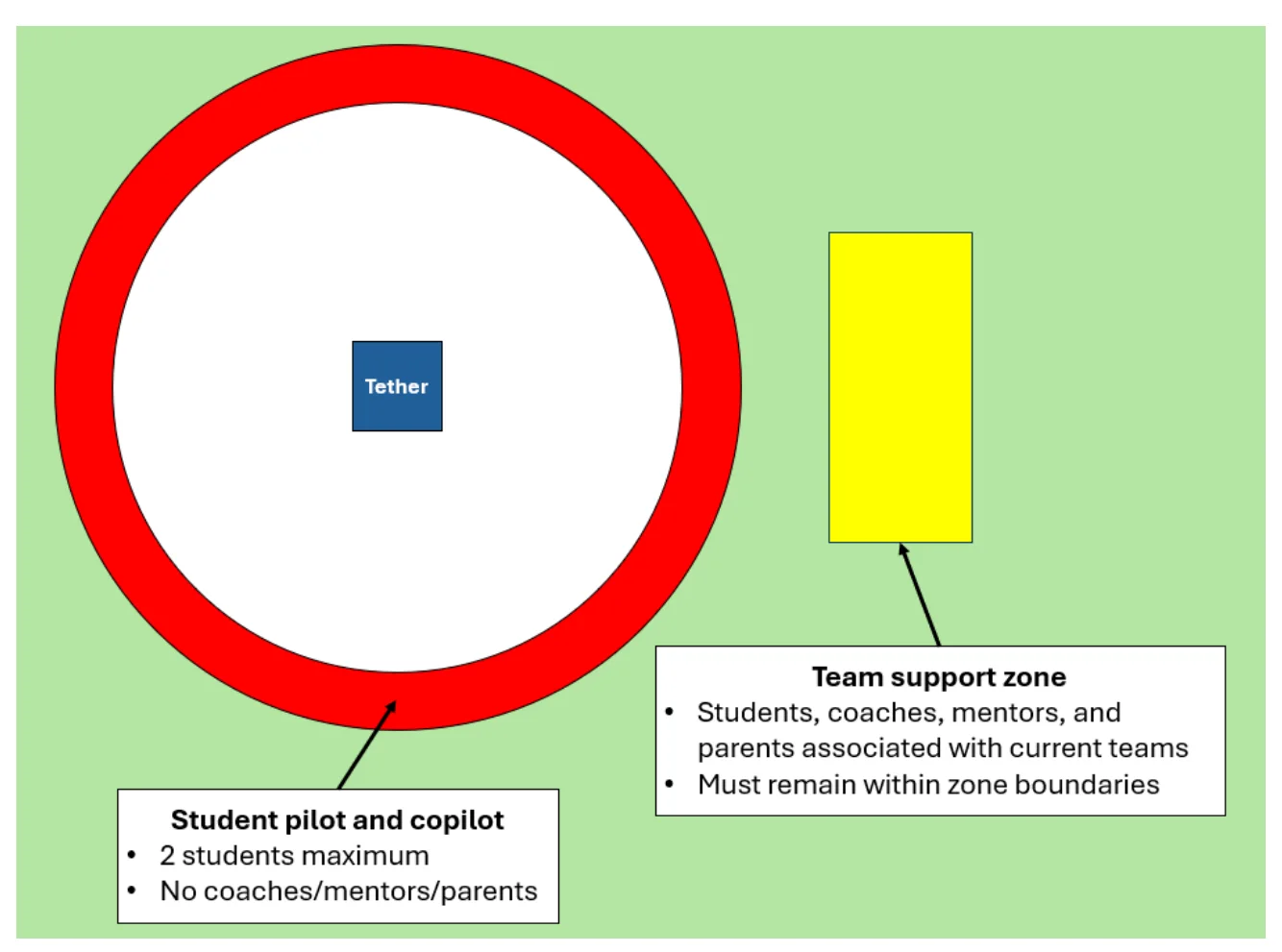
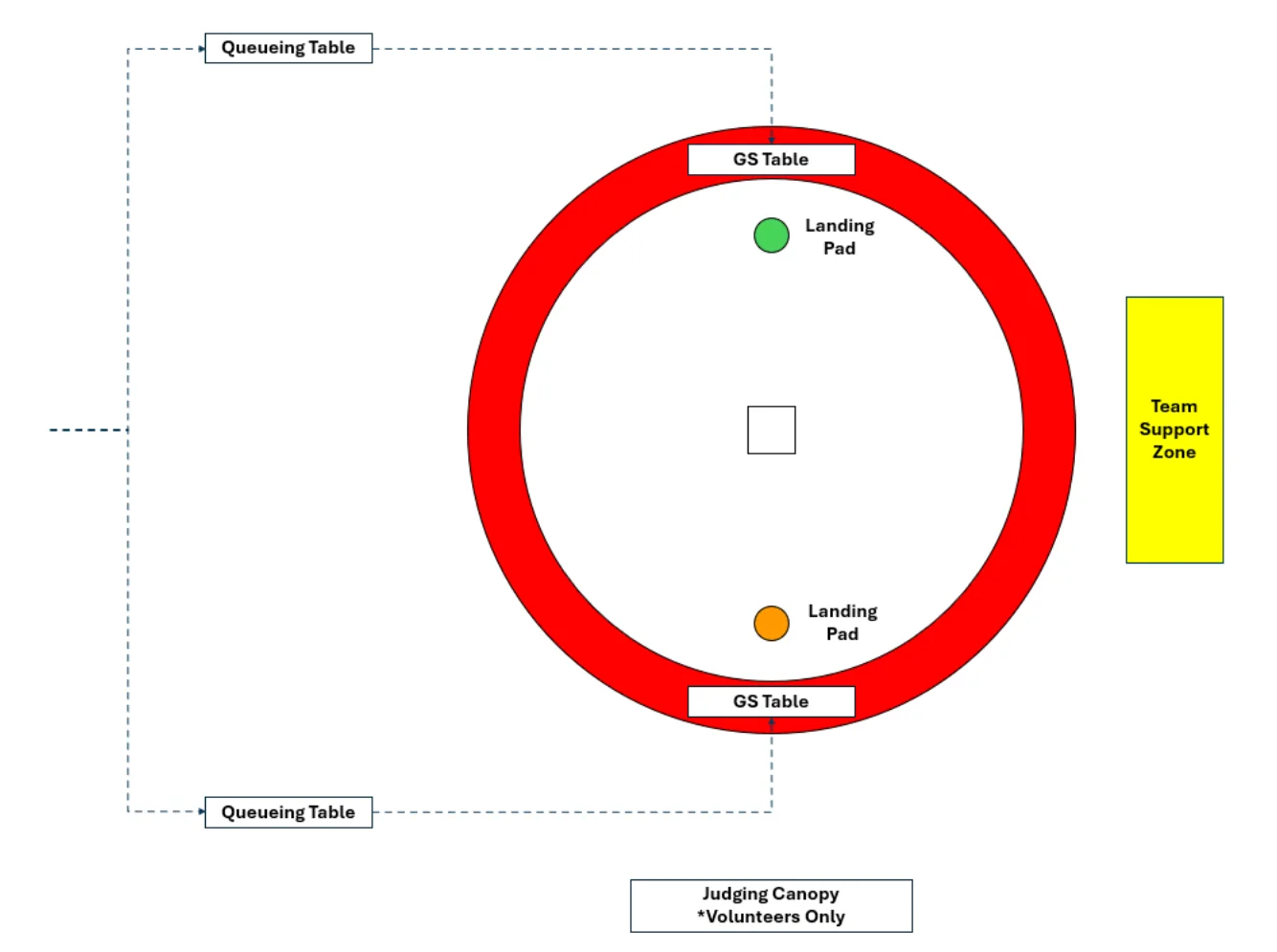
Figure 2.1 below shows the flying field boundaries. These boundaries will be marked with soccer cones (or similar items) and keep all personnel outside of the drone tether range. The red zone around the field is for the pilots and copilots of the current round only. Their teammates, coaches, mentors, and parents/guardians may spectate from the team support zone. Students and spectators from other teams not currently participating must stay outside of both zones and should watch from either the bleachers or the team pits. See Section 5.2 for details on this rule.
Team technical presentations are completed indoors. A projector will be provided, and the judging panel will display the teams’ virtually-submitted presentation slides.
2.2Team Roles#
Teams comprise of students and a coach, and they may also be supported by mentors, parents/guardians, school administrators, friends, and more. Table 2.1 gives further details about the roles and requirements of each team.
| Role | # | Requirements | Recommendations |
|---|---|---|---|
| Team Captain | 1 (Req’d) |
|
|
| Teammates | 1-4 (Rec’d) |
| |
| Pilot | 1 (Req’d) |
|
|
| Copilot | 1 (Req’d) |
|
|
| Coach | 1 (Req’d) |
|
|
*Middle school students may compete, but teams with two or more middle school students will not be eligible for awards (see Section 6).
2.3Event Schedule#
See Table 2.2 Table 2.3below for an example Regional Competition event schedule. Exact event schedules will be distributed to teams at the competition. Competition start and end times will be emailed to teams at least 1 week before their Regional Competition. Teams should anticipate competitions beginning as early as 7 a.m. and ending as late as 5 p.m. Times will vary based on factors such as the number of teams competing and venue size.
| Time Block | Event | Approx. Start | Notes |
|---|---|---|---|
| 0 | Setup | 5:30 a.m. | Volunteers set up venue. Teams may not enter premises until check-in begins. |
| 1 | Team Check-In | 7:00 a.m. | Teams MUST check in before participating. |
| 2 | Opening Ceremony | 8:00 a.m. | |
| 3 | Tech. Inspection | 8:15 a.m. | Teams MUST complete Tech. Insp. before flying. |
| 4 | Mission 1 Rounds Tech. Presentations | 8:30 a.m. | Mission 1 & Tech. Pres. occur simultaneously. Each team will receive at least 15 minutes between any events on their individual schedule. |
| 5 | Lunch | 11:30 a.m. | Free lunches for all registered students and coaches. |
| 6 | Mission 2 Rounds | 12:15 p.m. | |
| 7 | Score Calculations | 4:30 p.m. | Volunteers calculate final scores. |
| 8 | Closing Ceremony | 4:45 p.m. | Awards presented. |
| 9 | Cleanup | 5:00 p.m. | Volunteers clean up event/venue. Teams may assist if desired. |
2.4Season Schedule#
See Table 2.3 below for the 2024-2025 season schedule. Note that the ARC season will be beginning in the fall and will include virtual tasks throughout the season. All deadlines are final, so be sure to complete all submissions in a timely manner.
| Date | Event | Location | Notes |
|---|---|---|---|
| August 17, 2024 | Drone Order #1 Due | stemed.org/purchase-kit | Teams may choose to order through STEM-ED INC during any of three windows, or they may order from a third party at any time. |
| Aug 17 | Information Session #1 | Virtual (stemed.org/events) | Anyone interested in ARC may attend an Information Session to learn more. |
| Sept 7 | Information Session #2 | ||
| Sept 14 | Drone Order #2 Due | stemed.org/purchase-kit | See Drone Order #1 notes. |
| Sept 21 | Kickoff & Rulebook Release | Varies by region | Teams will receive further information upon registration. |
| Sept 28 | Coach Training | Virtual (stemed.org/events) | All coaches and mentors are welcome to attend. |
| Oct 26 | Registration Due | stemed.org/registration | If you wish to participate in the 2024-25 season, registration paperwork and fees must be completed by this date. |
| Registration Fee Due | |||
| Nov 9 | Drone Order #3 Due | stemed.org/purchase-kit | FINAL CHANCE See Drone Order #1 notes. |
| Jan 18, 2025 | Accountability Task #1 | stemed.org/arc- | See Section Error! Reference source not f ound. for task descriptions. |
| Feb 15 | Accountability Task #2 | ||
| Mar 29 | Accountability Task #3 | submissions | |
| Mar 29 | Student Waivers DUE | Legally required for student participation. | |
| April 12 | Antelope Valley Reg. Comp. | Little Rock High School | Teams will receive further information throughout the season from their respective regional coordinator. |
| April 26 | Mid-Atlantic Reg. Comp. | Flint Hill School | |
| May 3 | Philly Reg. Comp. | Pennovation Works | |
| May 10 | New England Reg. Comp. | Saint Anselm College | |
| May 17 | San Diego Reg. Comp. | Escondido Charter High School | |
| June 6-7 | National Championship | Saint Anselm College | Invitational event. |
2.5Eligibility Requirements#
2.5.1Season Participation Eligibility#
To participate in the ARC season, which includes submitting Accountability Tasks, accessing volunteer assistance through virtual office hours, and competing in a Regional Aerospace Robotics Competition, teams must complete all registration tasks by October 26, 2024.
Registration includes two components, each of which must be completed by the team coach:
- Submit the registration form: stemed.org/registration
- Pay the registration fee: stemed.org/registration
Remember that all deadlines are final. Please reach out as soon as possible with any questions or concerns.
Registration enables teams to participate in the season, but additional tasks must be completed to compete in the Regional Competition. All students must have a waiver completed by their parent/guardian submitted through WaiverSign (see Figure below) by March 29 th , 2025, in order to participate at the flying field or in photographs. Teams must also submit Pre-Competition Surveys and attend their Regional Pre-Competition Briefing; further details will be provided by teams’ respective Regional Coordinators.
Additionally, all teams must be able to pass the Technical Inspection (see Appendix B: Technical Inspection Rubric) and bring a physical copy of the pilot’s TRUST Exam Certificate to compete in any flying portions of the competition.
Teams must provide a budget spreadsheet to compete. See Sections Error! Reference source not f ound. and 4.1.5.
If teams are ineligible to compete in flying portions of the competition, they are still encouraged to complete their Technical Presentation. If teams are ineligible to compete in any portion of the competition, they are encouraged to attend as spectators to enjoy the learning experience.
2.5.2National Championship Eligibility#
All Regional Competition Eligibility Requirements also apply for the National Championship. Additionally, teams must receive a 2025 National Championship Invitation from their Regional Event and RSVP within 7 days of receiving the invitation.
Teams who do not RSVP within 7 days, or who decline the invitation, will forfeit their spot on the roster. The invitation will then be offered to the next eligible team from the respective region. There is no additional registration fee to attend the National Championship, but teams are responsible for their own travel expenses.
32024-25 Season Challenges#
The 2024-25 season will include 2 semi-autonomous flight missions, a collection of virtual tasks, and a technical presentation. See the following sections for details on each portion.
During each flight mission, teams will be assigned a color: Orange or Green. Color assignments will be included on the competition schedule, and teams will be queued by color. This assignment is solely used for queueing and determining which color objects a team will be using, and it has no bearing on the team or drone.
See Appendix F: Mission Diagrams for diagrams to clarify each task.
3.1Component Descriptions#
Table 3.1 below lists the components used for flight missions, along with the acronym used to label them. See 2024-25 Field Kit Assembly Guide for a detailed guide on building an official competition field, along with recommendations for affordable alternative components for practice.
| Name | Acronym | Description | Representative Item on Field |
|---|---|---|---|
| Payload 1 | P1 | Medical Supplies | Cube |
| Payload 2 | P2 | Food Kit | Tennis Ball |
| Field Component 1, Individual | FC1 i | Direct Delivery Location (Village) | Scoring Post |
| Field Component 1, Cooperative | FC1 c | ||
| Field Component 2 | FC2 | Delivery Pickup Location (Nearby Field) | Scoring Zone |
| Field Component 3 | FC3 | Skill Test 1 | Hover Post |
| Field Component 4 | FC4 | Skill Test 2 | Numbered Landing Pad |
| Field Component 5 | FC5 | Landing Pad | Landing Pad |
| Field Component 6 | FC6 | Tether | Tether Block and Cable |
| Mission Equipment 1 | ME1 | Ground Station | Table |
| Mission Equipment 2 | ME2 | Queueing Location | Table |
3.2Mission 1: Cubic Conundrum#
Here in the United States of America, we are fortunate to have medical supplies, fresh food, and electronics equipment readily available for all. Think about living in a country without access to these critical provisions – everyday life would be far more dangerous and uncomfortable. Now that you are learning the engineering skills required to create a drone, you have the amazing ability to make the world a better place!
Your mission is to create a drone that can provide medical supplies and food to remote communities. When completing this challenge, you must consider the drone’s abilities, the time and funding constraints, and the pilot’s experience levels. Ideally, we wish to deliver supplies directly to villages, providing immediate access. However, this is a difficult and small target – thus, you may also consider making an indirect delivery by dropping supplies in a large field a few miles away. This is more difficult for the recipients to retrieve, but it is easier to complete the mission with accuracy. You will also be delivering supplies at the same time as a drone from another humanitarian organization, so you must be careful to cooperate. Finish the round in an indirect delivery location to await the arrival of civilians.
This section will provide detailed instructions for completing this mission.
3.2.1Tasks#
Your mission consists of the following tasks:
- Lift medical supplies (P1):
- Lift one P1 (any height and duration)
- Lift food kit (P2):
- Lift one P2 (any height and duration)
- Deliver medical supplies (P1) to direct delivery location (FC1 i or FC1 c ):
- P1 is delivered by being placed on FC1 (individual or cooperative) vertical post.
- P1 may only be placed on team’s own FC1 unless completing Task 4 (see next task).
- Orange team is to score P1 onto orange FC1s.
- Green team is to score P1s onto green FC1s.
- Coordinate delivering medical supplies (P1) to direct delivery location (FC1 c ):
- Orange FC1 c :
- Step 1: Orange team places P1 onto Orange FC1 c .
- Step 2: Green team places P1 onto Orange FC1 c (stacking onto Orange P1).
- Correct stacking order is deemed a successful completion of task.
- Incorrect stacking order is not a successful completion of task.
- If Green team places P1 onto Orange FC1 c first (no Orange P1 delivered yet), no points will be awarded to either team. Orange team may continue to score individual points for placing P1 onto Orange FC1 c .
- Green FC1:
- Step 1: Green team places P1 onto Green FC1.
- Step 2: Orange team places P1 onto Green FC1 (stacking onto Green P1).
- Correct stacking order is deemed a successful completion of task.
- Incorrect stacking order is not a successful completion of task.
- If Orange team places P1 onto Green FC1 first (no Green P1 delivered yet), no points will be awarded to either team. Green team may continue to score individual points for placing P1 onto Green FC1 c .
- Copilots from both teams may communicate with one another if desired. They must remain within the red zone while doing so.
- Deliver medical supplies (P1) to delivery pickup location (FC2):
- P1 is delivered by being placed anywhere within FC2.
- If P1 is partially within FC2, it is deemed a successful completion of task.
- Green team and Orange team may both score within either FC2.
- Deliver food kit (P2) to delivery pickup location (FC2):
- P2 is delivered by being placed anywhere within FC2.
- If P2 is partially within FC2, it is deemed a successful completion of task.
- Green team and Orange team may both score within either FC2.
- End mission in a delivery pickup location (FC2):
- End mission anywhere within either FC2.
- If drone is partially within FC2, it is deemed a successful completion of task.
- (NEW FOR NATIONAL CHAMPIONSHIP) Minimize the number of trip segments between payload staging area to a delivery area:
- A segment is defined as an attempted trip from a payload staging area to the delivery area (FC1 i , FC1 c , and/or FC2).
- Anytime the drone returns to the payload staging area, a new segment will begin.
- After 1 segment is completed, each additional segment will receive a deduction.
- A team will only be given a maximum of ten deductions.
- Example: The drone lifts P2, flies to FC2, and successfully drops P2 into FC2. This is considered a completion in 1 trip segment, and thus no deduction will be awarded.
- Example: The drone lifts P2, flies to FC2, but drops it outside of FC2 and is unable to successfully score the object. By returning to the payload staging area, the drone will begin its second trip segment for that scoring attempt. Thus, one trip segment deduction will be awarded.
Each round of Mission 1 will be 7 minutes.
Teams will be scheduled to complete at least one, and up to three, rounds of Mission 1 at the National Championship. All teams at the event will be scheduled to complete the same number of rounds. If multiple rounds of Mission 1 take place, teams will be given a final score equal to the average of all round scores.
3.2.2Field Layout#
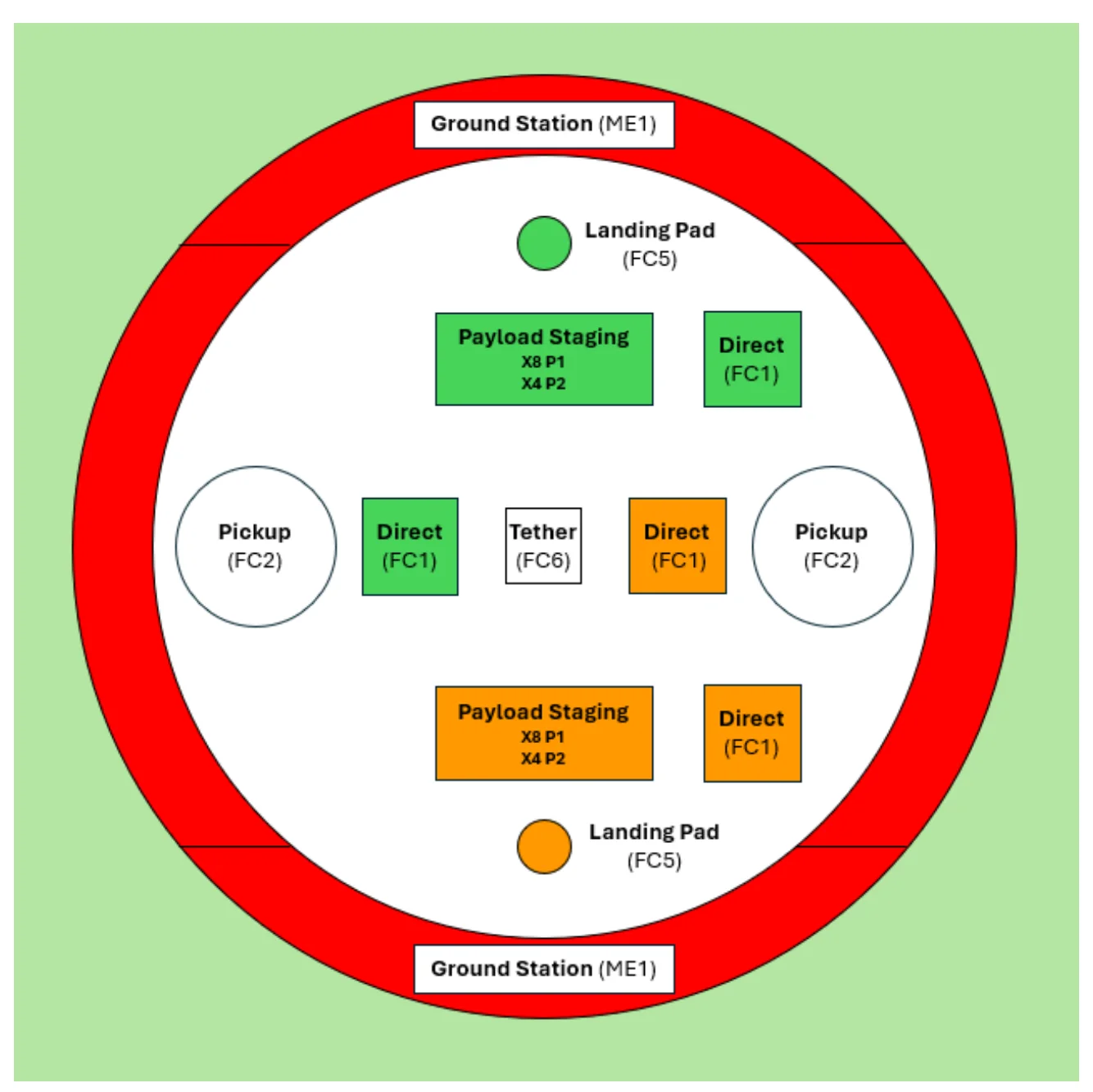
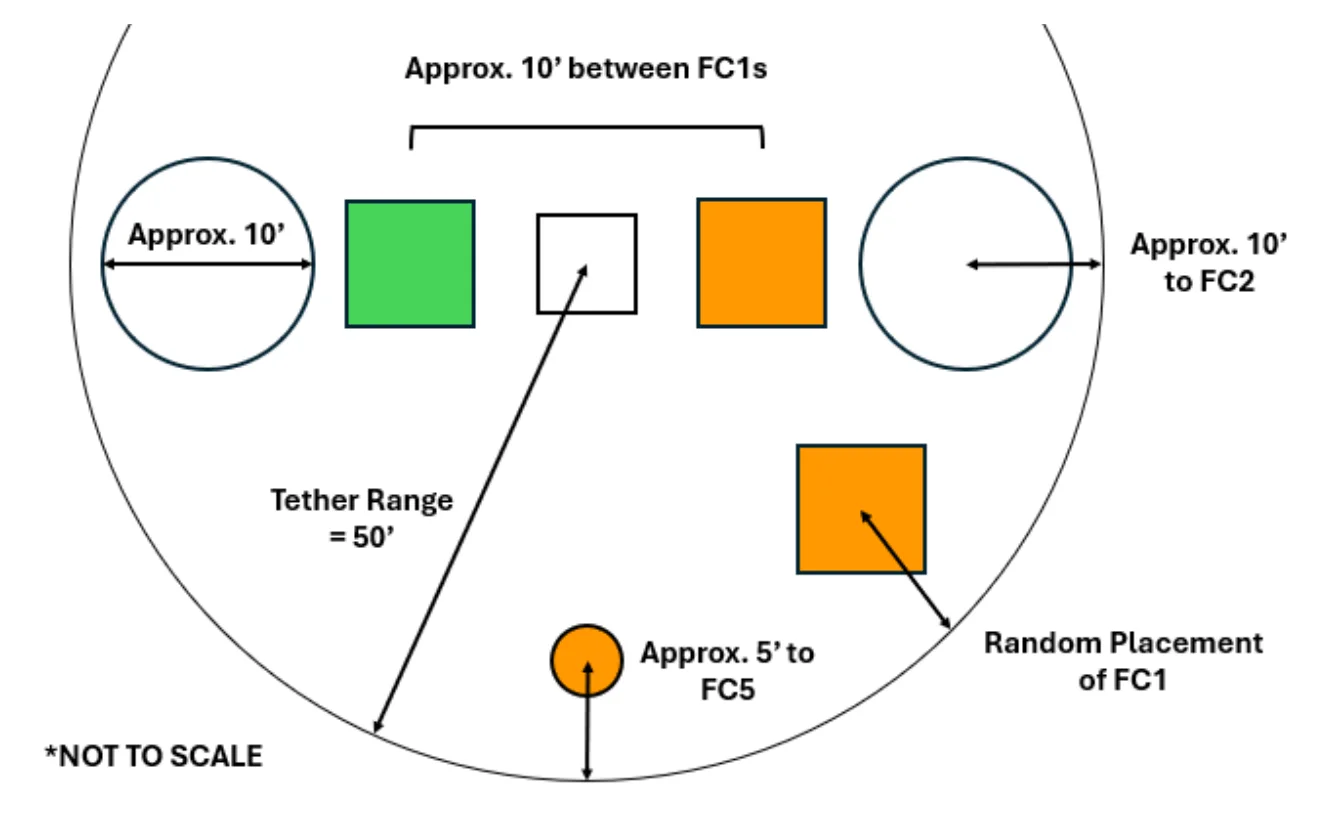
The following figures provide field diagrams. See Figure 3.1 for the placement of each item on the field. See Figure 3.2 for measurements of item placement (figure not to scale).
Notes:
- Many items have approximate location callouts, indicating variability in field setups.
- “Random Placement” items will be located in the same side of the field shown in field diagrams, but no measurements are indicated.
- Teams are advised to practice using various configurations to prepare for all possibilities.
3.3Mission 2: Count on Me#
Semi-autonomous drone missions are only as successful as their pilots and technology are. Thus, testing the drone, debugging issues, and practicing flight are critical aspects of preparation.
Your task is to prepare for a surveillance mission by practicing applicable skills. Before being sent on the real mission, you must prove your abilities by completing two challenges: hovering within a 3-foot vertical range and using a camera to read numbers on the ground. By mastering these skills, your team will be prepared to complete the true mission: safely flying through a 3-foot diameter tunnel, then finding critical locations on the ground via camera feed.
This section will provide detailed instructions for completing this mission.
3.3.1Tasks#
Your mission consists of the following tasks:
- (NEW FOR NATIONAL CHAMPIONSHIP) Skill Test 1: Hover within two 3-foot vertical ranges, as indicated by hover post (FC3)
- Hover next to FC3 within lower indicated vertical range for 10 consecutive seconds.
- If drone exits vertical range, the 10-second timer will be reset.
- The Flight Judge will count the 10 seconds audibly to the pilot. Once 10 seconds are reached, the task will be deemed complete and the drone may proceed to step b.
- Next, hover next to FC3 within upper indicated vertical range for another 10 consecutive seconds.
- If drone exits vertical range, the task must be restarted from step a to receive points.
- The Flight Judge will count the 10 seconds audibly to the pilot. Once 10 seconds are reached, the task will be deemed complete and the drone may exit the vertical range.
- Points will be awarded once BOTH steps a and b are completed consecutively. No points are awarded for completing only one step.
- Note: Teams MUST pilot this challenge manually (no automatic hover functions).
- (NEW FOR NATIONAL CHAMPIONSHIP) Skill Test 2: Land on ONLY numbered landing pads (FC4)
- There will be multiple FC4 with alphabetical and numerical indicators. Teams will receive points for landing on FC4 with numbers only.
- Landing on a letter will be penalized, affecting the final score of Mission 2.
- Option 1: Land on any numbered FC4
- May use camera feed, but not required
- Option 2: Land on numbered FC4 in numerical order
- Teams must ONLY land on the pads with numbers on them, starting from the smallest one to the largest one. There will be at least two FC4 with numbers.
- Pilots must use camera feed to display legible image of each number on ground station screen.
- Touching any part of an FC4 upon landing will be considered successfully landing on it.
- End round on any landing pad (FC4 or FC5)
- Touching any part of FC4 or FC5 upon landing will be considered successfully landing on it.
- (NEW FOR NATIONAL CHAMPIONSHIP) Complete tasks 1 through 3 before opponent
- Complete Skill Tests 1 and 2, then land on any landing pad, before the other team on the field completes these tasks.
Each round of Mission 2 will be 4 minutes.
Teams will be scheduled to complete at least one, and up to three, rounds of Mission 2 at the National Championship. All teams at the event will be scheduled to complete the same number of rounds. If multiple rounds of Mission 2 take place, teams will be given a final score equal to the average of all round scores.
3.3.2Field Layout#
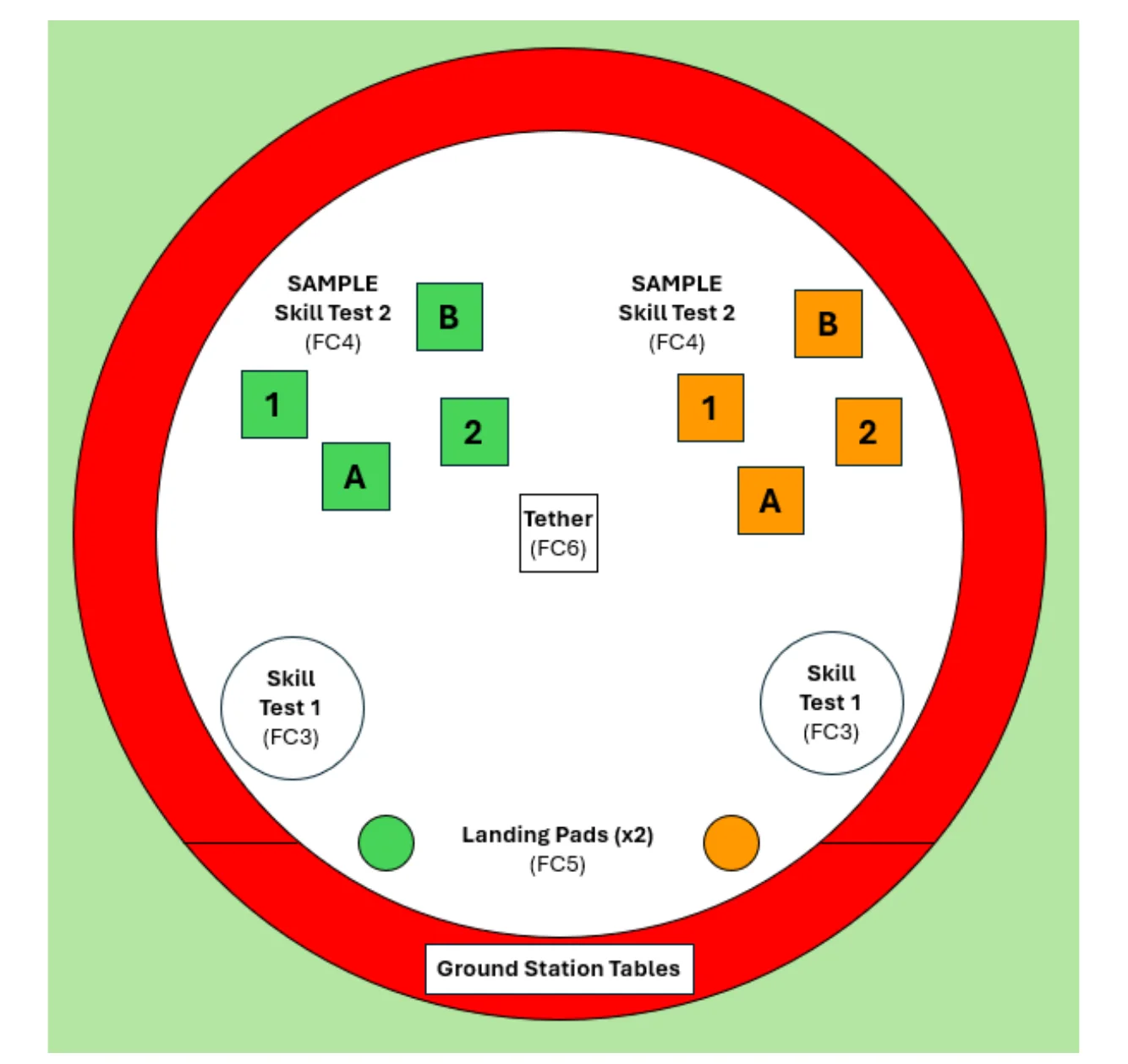
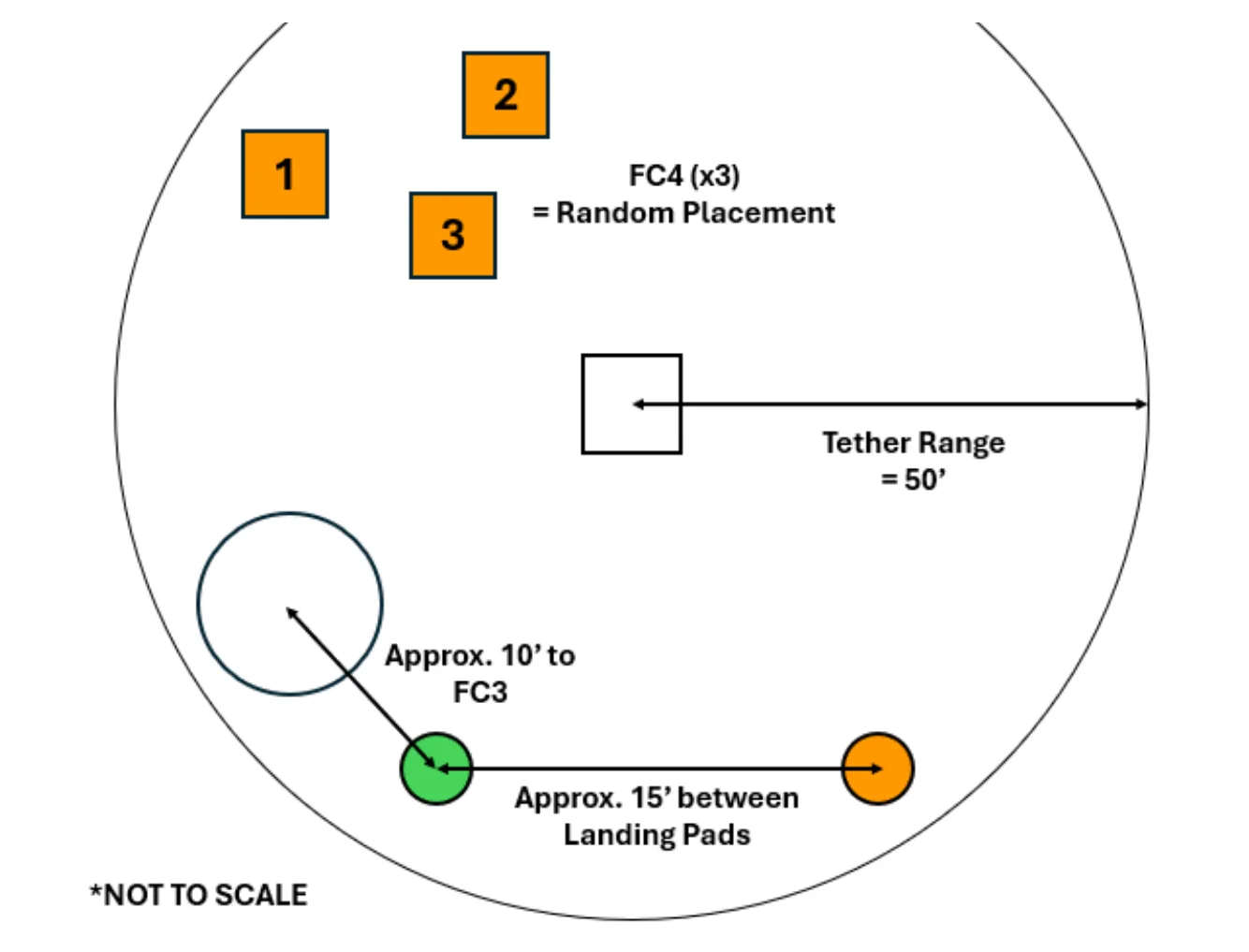
The following figures provide field diagrams. See Figure 3.3 for the placement of each item on the field. See Figure 3.4 for measurements of item placement (figure not to scale). Note that both drones will be piloted from the same side of the field. Any attempt to interfere with an opponent’s operations will result in immediate disqualification from both Missions 1 and 2.
Notes:
- Many items have approximate location callouts, indicating variability in field setups.
- “Random Placement” items will be located in the same side of the field shown in field diagrams, but no measurements are indicated.
- Teams are advised to practice using various configurations to prepare for all possibilities.
3.4Flight Procedure#
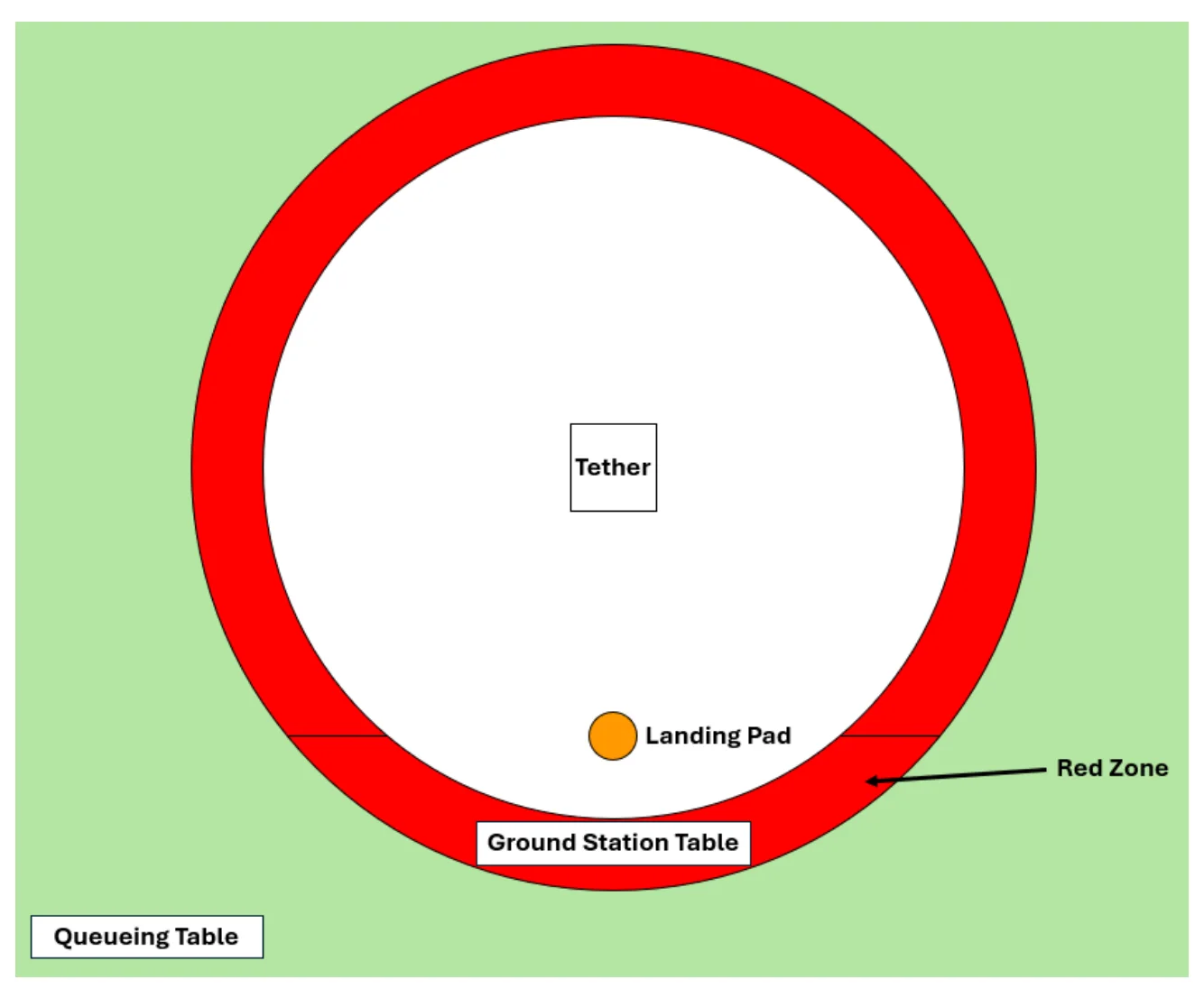
Flight portions of the competition will follow the process below (see Figure 3.5 for location references). Please note that the Field Manager will be directing all major steps, and teams must wait for his/her instruction before completing these steps. The Field Manager is also responsible for safety and final rulings. Teams are expected to obey Field Manager directions, including to activate the Kill Switch immediately when commanded.
Teams must arrive to the Queueing Table at least 5 minutes before their round is scheduled to begin. Teams who do not arrive to their round will forfeit their time slot and will not be given an opportunity to complete it at a later time.
| Step | Action | Location | Note |
|---|---|---|---|
| 1 |
| Queueing Table | 5 minutes before match time. |
| 2 |
| Red Zone | Must wait for direction of Field Manager. |
| 3 |
| Ground Station Table & Landing Pad | |
| 4 |
| Landing Pad, Ground Station Table | Must wait for direction of Field Manager. |
| 5 |
| Ground Station Table | |
| 6 |
| Ground Station Table | Must wait for direction of Field Manager. |
| 7 |
| Ground Station Table | |
| 8 |
| ||
| 9 |
| Must land IMMEDIATELY when time ends. | |
| 10 |
| Ground Station Table | |
| 11 |
| Field | Must wait for direction of Field Manager. |
| 12 |
| Field | MUST unplug battery first. |
| 13 |
| Ground Station Table |
3.5Technical Presentation#
Designing, building, testing, debugging, and flying are all useful skills; however, if an engineer cannot effectively communicate their ideas, the ideas are unusable. Thus, learning to create and deliver a technical presentation, along with supporting spreadsheets, is vital.
Your task is to use professional communication concepts to document and present your work. The following sections will detail the requested information; note that some points are open to interpretation, and teams are encouraged to be creative when deciding how to display their results. Presentations should be given entirely by students without the assistance of coaches, mentors, or parents/guardians.
3.5.1Team Logistics#
- Team organization and dynamics:
- List of team members and their roles
- Photo(s) of team
- Details on meeting style
- Team schedule for project completion:
- Task breakdown
- Team member(s) responsible for each task
- Planned time of completion for each task
- Actual time of completion for each task
- Financial strategy/budget:
- Cost breakdown for each item used
- Strategy behind purchase decisions
- Funding source(s)
- Ethical considerations:
- Saint Anselm College Center for Ethics in Society will conduct an initial session on Ethics in the fall, detailing how the topic will be graded during presentations.
- There will be a follow-up session in the spring where example ethical vignettes will be introduced.
- In the technical presentation portion of ARC, teams will be presented with a vignette that will require them to provide impromptu points of ethical consideration.
- Additionally, teams may be asked to convey how their drone’s capabilities could be used to improve the world.
3.5.2Engineering Process#
- Software methodology:
- Software chosen and why (if applicable)
- Ground station chosen and why (if applicable)
- Waypoint navigation strategy (Virtual Mission 4)
- Camera feed setup
- Mission overview and strategy:
- Method of choosing tasks to complete
- Strategy of completing missions
- Mechanism design:
- Design process
- Early designs/prototypes vs final result
- Flight testing procedure:
- Test setup and procedure
- Lessons learned during successful and unsuccessful flight tests
3.5.3Final Product#
- Vehicle overview:
- Labelled images of drone and mechanism
- View of entire system (front, top, side, isometric views), with primary dimensions (height, width, depth) clearly labelled
- Electronics diagram:
- Layout of major electronics systems (flight controller, speed controllers, motors, etc.)
- Product success:
- Flight test results
- Projected competition score
3.5.4Presentation Style#
- Slides are legible and clear:
- Text size and color choices allow judges to easily read slides
- Text, photos, and labels are placed to avoid crowding/overlapping
- Presenters speak clearly and audibly:
- Presenters can be heard by all judges
- Presenters can be understood by all judges
- Presenters are professional and well-prepared:
- Minimal mannerisms such as “um” and “you know”
- Presenters are ready to speak about assigned subjects/slides
- All team members speak:
- Each student team member is actively involved in presentation
- Q&A responses:
- Team professionally answers all questions from judges
*Note that judges will understand presenter limitations due to disabilities. Presenters will be judged according to individual preparedness and efforts.
3.5.5Procedure#
- Submit Slides:
- Teams are to virtually submit their Technical Presentation Slides by midnight 7 days before their Regional Competition (stemed.org/arc-submissions)
- If teams submit multiple times, the most recent submission prior to the deadline will be used by the Technical Presentation Judges
- Setup:
- Judges project submitted slide deck onto screen
- Team sets up desired display materials
- Presentation:
- Team presents for up to 10 minutes
- Judges raise hand to signify 1 minute remaining
- Q&A:
- Judges ask relevant questions to students for up to 5 minutes
- Students answer questions as they deem fit
- Cleanup:
- Team gathers belongings and exits
- Next team begins setup
3.6Scoring Equations#
3.6.1Possible Scores#
The following tables provide the maximum possible scores for each task.
| # | Task | Score | # Possible | Total Score |
|---|---|---|---|---|
| 1 | Lift P1 | 20 | 1 | 20 |
| 2 | Lift P2 | 30 | 1 | 30 |
| 3 | Deliver P1 to FC1 | 75 | 8 | 600 |
| 4 | Coordinate delivering P1 to FC1 c | 50 | 2 | 100 |
| 5 | Deliver P1 to FC2 | 20 | 8 | 160 |
| 6 | Deliver P2 to FC2 | 50 | 4 | 200 |
| 7 | End in FC2 | 50 | 1 | 50 |
| 8 | Segment Penalty | -50 | 10 | -500 |
| Total | 1,000 (if only | one segment | used per score) |
| # | Task | Score | # Possible | Total Score |
|---|---|---|---|---|
| 1 | Skill Test 1: Hover at FC3 | 200 | 1 | 200 |
| 2a | Skill Test 2: Land on numbered FC4 | 30 | 2 | 60 |
| 2b | Skill Test 2: Land on numbered FC4s in order | 400 | 1 | 400 |
| 2c | Skill Test 2: Land on an alphabet FC4 | -100 | 2 | -200 |
| 3 | End on any FC4 or FC5 | 40 | 1 | 40 |
| 4 | Complete items #1-3 before opponent | 100 | 1 | 100 |
| Total | 800 (max | possible) |
| # | Task | Score |
|---|---|---|
| 1 | Team organization and dynamics | 15 |
| 2 | Team schedule | 25 |
| 3 | Financial strategy/budget | 25 |
| 4 | Ethical considerations/vignette | 35 |
| 5 | Software methodology | 25 |
| 6 | Mission overview and strategy | 75 |
| 7 | Mechanism design | 75 |
| 8 | Flight testing procedure | 50 |
| 9 | Vehicle overview | 75 |
| 10 | Electronics diagram | 50 |
| 11 | Product success | 50 |
| 12 | Legible/clear slides | 10 |
| 13 | Clear and audible speaking | 10 |
| 14 | Professional and well-prepared | 20 |
| 15 | All team members speak | 30 |
| 16 | Q&A responses | 30 |
| Total | 600 |
| Mission | Penalty* | Amount |
|---|---|---|
| Mission 1, Mission 2 | Unintentional collision with opponent. | DQ from all Rounds of Mission |
| Intentional collision with opponent. | DQ from Competition | |
| Technical Presentation | Presentation continues after time is called | -50 |
*Actions and intentions as deemed by Field Manager.
| Mission | Score |
|---|---|
| Mission 1 | 1,000 |
| Mission 2 | 800 |
| Technical Presentation | 600 |
| Total | 2,400 |
4Drone Requirements#
4.1Mechanical Requirements#
The UAV must meet all requirements listed below to be eligible for flight. The UAV will be inspected at the competition prior to flight (see Appendix B: Technical Inspection Rubric).
All components must also remain within the budget allowances shown in Table 4.1. Teams will be required to present their list of components and prices during the technical inspection. Note that the kit drone offered by STEM-ED INC will meet all financial requirements.
All designing, building, coding, and testing is to be completed by students only. Teams may request guidance from adult coaches and mentors, but all hands-on work and major decisions should be completed by students only.
Drones MUST have a kill switch to immediately cut the drone’s motors in case of emergency. Please visit youtube.com/@aerospaceroboticscomp501c3 for assistance if needed.
4.1.1Structure#
Teams must create a drone structure that fits within size and component limitations:
- The overall UAV dimensions must not exceed 36 inches by 36 inches by 36 inches when
placed on the ground with no propellers attached (the drone should be able to fit in a box that is a 36-inch cube).
- The UAV must have 4 motors with 1 propeller each. These propellers may not exceed 12
inches in diameter. The UAV must not have any lifting surfaces other than these propellers. o Motors: Readytosky 2212 920KV Brushless Motors (Or similar) (Link) o Propellers: GemFan 1045 CW CCW Propeller Props (Or similar) (Link)
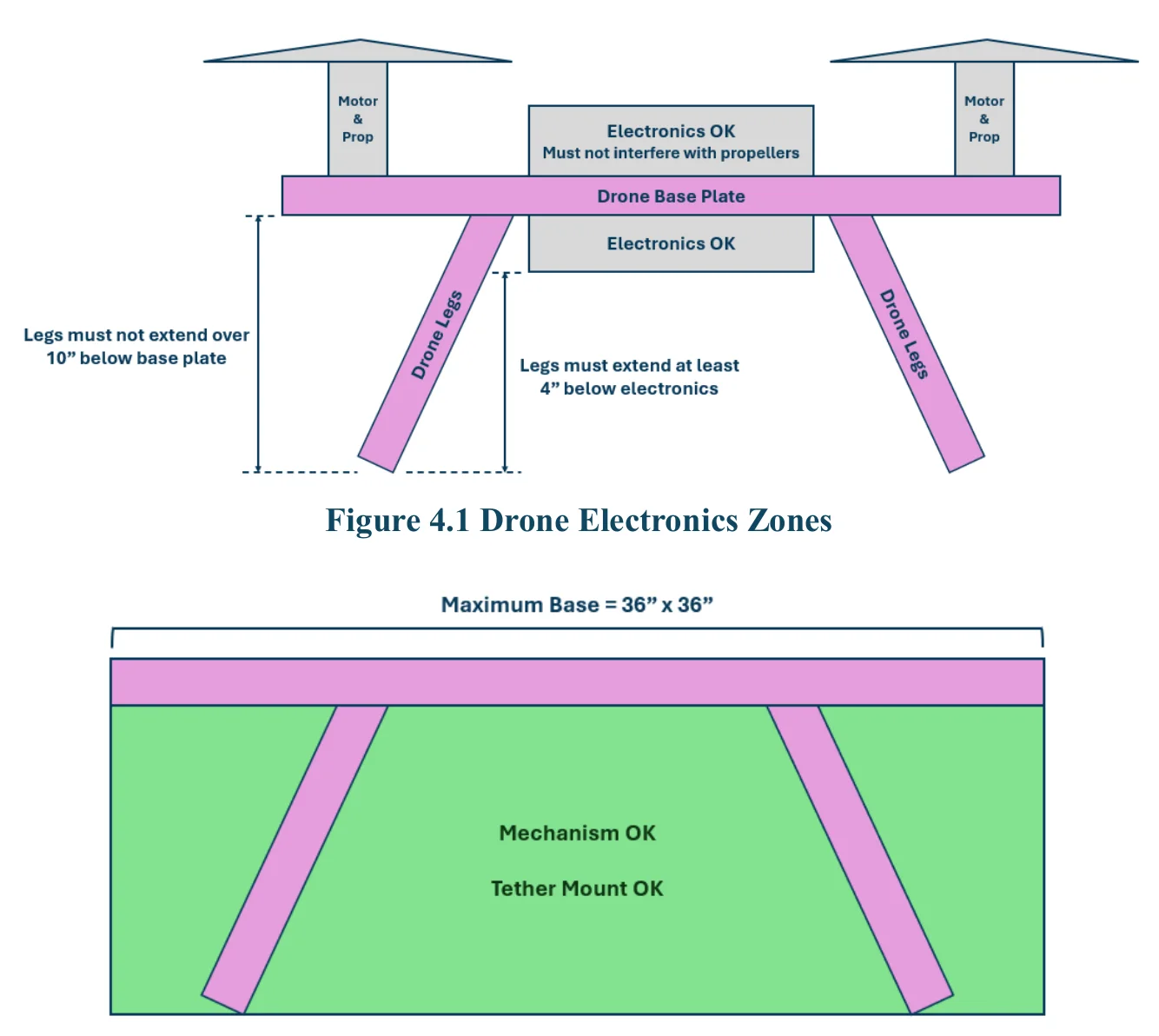
- The UAV must have a carabiner clip securely fastened within the tether zone (see Figure
4.2). This carabiner must be connected to the field tether carabiner before the drone may be powered on.
- The structure must be sturdy, as judged by the Technical Inspector. Components may not
be loose.
- The drone must stand on legs. The legs must extend at least 4 inches below the electronics
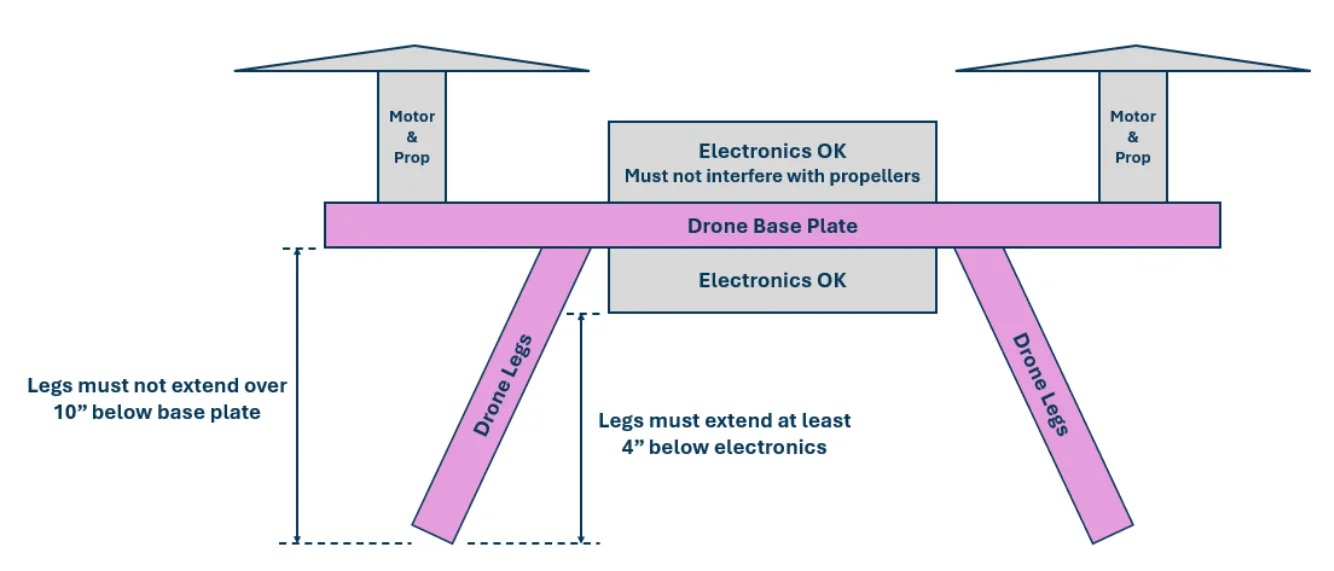
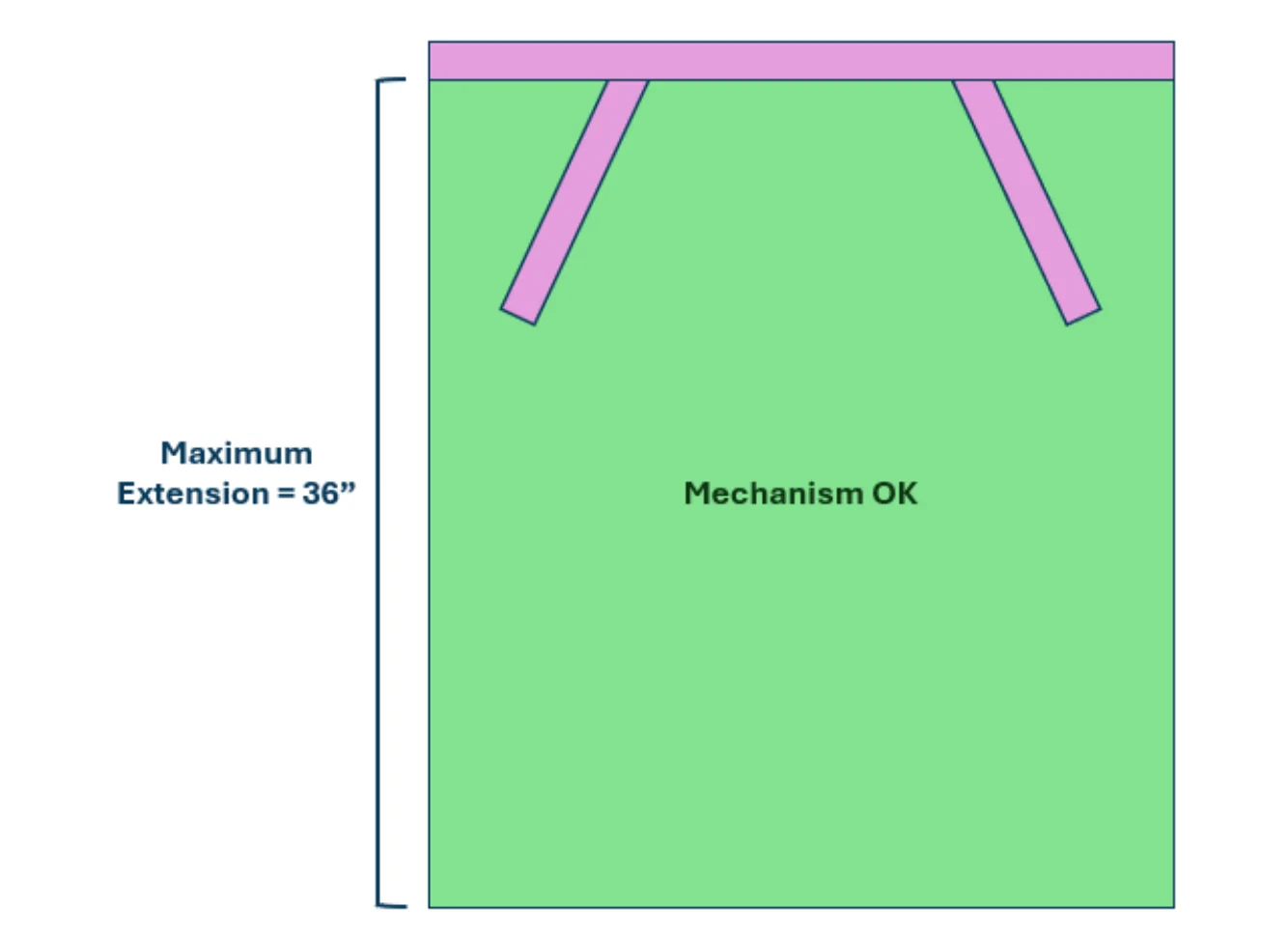
or drone structure closest to the ground. The legs must extend no greater than 10 inches below the drone base plate. See Figure 4.3.
4.1.2Mechanism Design#
Teams must create a unique mechanism that meets size and structural integrity requirements:
- Teams must design and build a unique mechanism to complete the flight tasks. Teams may
not use a Commercial Off The Shelf (COTS) mechanism, such as a pre-made claw.
- The mechanism must be controlled using no more than one servo.
- The mechanism must begin within the mechanism allowable zone as seen in Figure 4.2.
The mechanism may not extend above the drone base plate at any time.
- The mechanism may not detach from the drone at any time during flight.
- The mechanism must not extend beyond the mechanism allowable zone seen in Figure 4.3
during flight.
- Teams may use different mechanisms for different competition events, but all mechanisms
must pass technical inspection to be used (see Appendix B: Technical Inspection Rubric).
4.1.3Controls#
Teams must use the required electronics to control their drones:
- Teams must have a GPS sensor securely mounted onto the UAV.
- Teams must use Pixhawk (any version) or PX4 (used in DEXI PX4 drone – see Section
4.1.6) flight controller software to control all electronics components.
- Sensors: o Teams may use the accelerometer, gyroscope, magnetometer, and barometer contained within the Pixhawk flight controller. o Teams may not purchase/use any additional sensors. o Teams may add the competition-provided camera (see Section 4.1.6) to transmit live footage to their ground station.
4.1.4Batteries#
Teams must use batteries that fit the following specifications (see Section 4.1.6 for recommendations):
- Main UAV Battery: o Teams must use a lithium polymer (LiPo) battery to power the Pixhawk flight controller. o The battery cannot have more than 4 cells UNLESS using the DEXI PX-4 Development Kit (see Table 4.1). o Teams must use commercially available batteries. Homemade batteries are not allowed. o Teams must use proper battery usage/storage techniques – see Section 4.2. o Teams may not use any batteries displaying signs of damage, including dents, cracks, swelling, and smoking. o Recommended battery: CNHL 2200mAh 3S LiPo Battery 30C 11.1V LiPo Battery with XT60 (Link).
- Servo Battery: o Teams must use a nickel-metal hydride (NiMH) battery to power the mechanism servo. o Recommended battery: Tenergy NiMH Receiver RX Battery with Hitec Connectors 6V 2000mAh (Link).
4.1.5Budget Requirements#
Teams may not exceed the budget requirements listed in Table 4.1 – this is a requirement for participating in the competition. Teams must provide a spreadsheet of all used items and associated costs (commonly known as a Bill of Materials, or BOM, in industry). Teams may list the actual purchase price for each item if it differs from the retail price.
| Item | Max. $ | Notes |
|---|---|---|
| Drone | $2,500 | Acceptable Options: |
| ||
| ||
| Mechanism | $300 | Includes: |
| ||
| Transmitter/Receiver | $200 | See recommended below. |
| Sensors | $0 | No additional sensors may be purchased. |
| Tether Supplies | - | Required carabiner |
| Camera | - | May use any for practice, but may only use required models at competition (see also Section 4.1.6).• Camera: Link• Camera Feed Monitor: Link |
| Camera Feed Monitor | - | |
| Total | $2,800 | Does not include required carabiner, camera, and camera feed monitor. |
4.1.6Supplies and Sources#
The following options are recommended as acceptable and compatible components for teams to use. Note that STEM-ED INC is not sponsored by nor endorses any of the recommended suppliers, and teams are not required to purchase through the provided links.
Required Components
- Carabiner: Any strong carabiner with a properly-functioning latch to link with tether carabiner.
- Camera Mount: If using a camera, drones must have quick attachment method that does not
damage the camera or its antenna. Teams may purchase a camera and monitor for practice (see links below), but teams may not bring them to the competition, as they may cause signal interference. Cameras and monitors will be supplied by ARC at each competition. o Camera: RunCam Spotter V2 FPV Camera and 5.8GHz Transmitter (Link). o Monitor: RunCam 5.8GHz 4.3” FPV Display Screen (Link).
Recommended Drone Kits
- Option 1: Holybro S500 V2 Kit (Link). This can be purchased through the Holybro website or
through STEM-ED INC (Link).
- Option 2: DEXI PX4 Development Kit (Link). Note that this drone kit will require the addition
of team-designed legs.
Recommended Components
- Motors: Readytosky 2212 920KV Brushless Motors (Link).
- Propellers: GemFan 1045 CW CCW Propeller Props (Link).
- Flight Controller: Pixhawk 6C (Link). (Included in Holybro S500 V2 Kit)
- Servo: Deegoo [4-Pack] MG996R 55g Metal Gear Torque Digital Servo Motor (Link).
- LiPo Battery: CNHL 2200mAh 3S 30C 11.1V LiPo Battery with XT60 Connection (Link).
- NiMH Battery: Tenergy NiMH Receiver RX Battery with Hitec Connectors 6V 2000mAh
(Link).
- Transmitter/Receiver: Flysky FS-i6X 6-10CH 2.4GHz AFHDS RC Transmitter w/ FS-iA6B
Receiver (Link).
Necessary Tools
- Soldering Iron
- Allen Wrenches
- Safety Glasses
- Zip Ties
- Computer o Research and access resources o Create budget spreadsheet o Create Technical Presentation slides o Complete virtual tasks
- Paper and Writing Utensils o Record notes during meetings. o Draw mechanism prototype ideas.
Banned Components
The following components may not be brought to the competition venue, as they would cause signal interference which may lead to drone malfunctions. This requirement is for both safety and sportsmanship and will be strictly enforced (see Section 5.2).
- Teams may not bring any telemetry radios to the competition venue.
- Teams may not bring any drone cameras or camera feed monitors to the competition venue.
4.2Safety and Legal Requirements#
STEM-ED INC will be releasing official guidelines for safety policies and adherence with FAA requirements. This document will include additional rules and will be considered an addendum to the 2024-25 ARC Regional Competition Rulebook.
5Competition Rules#
5.1Logistics#
Upon arrival at the competition venue, teams must first report to the check-in table where volunteers will distribute items such as wristbands, schedules, and maps. Teams will then be directed to their pits, which will be their “home base” throughout the event. Teams will be able to keep all items at their pit table and charge batteries at a nearby battery charging station.
Once flying matches begin, teams must follow the routes as seen in Figure 5.1. Teams are expected to be at the queueing table on their respective side of the field during the match before their assigned time slot. Queueing volunteers will guide teams from the queueing table to the ground station table once their assigned time slot begins.
Teams who are not competing in the current match may not enter any field zones at any time. Students who are not the pilot or copilot, along with coaches, mentors, and parents/guardians, may not enter the red zone at any time. These rules are critical for safety, so all team members and spectators are expected to follow volunteer instructions and to exit areas immediately upon request.
5.2Conduct Requirements#
If teams believe they received an incorrect ruling during their flight round, they are welcome to discuss the issue with the Field Manager, who will be happy to correct any errors as needed. Ruling challenges may be made by student team members only, not parents/guardians, coaches, mentors, or spectators, and should remain cordial.
Teams are expected to adhere to safety rules at all times, including obeying field boundaries, keeping electronics powered off at all times off-field, completing a reinspection after a drone is damaged, and using the tether at all times on the field. Volunteers will provide guidance and reminders, but continued willful non-compliance will result in a discretionary penalty.
See Table 5.1 below for potential penalties, the distribution and value of which will be determined by the Field Manager and/or respective Regional Coordinator. These rules are in place to ensure the competition is safe and enjoyable for all. Teams attempting to follow rules and remain sportsmanlike will not need to worry about receiving these penalties.
| Penalty | Potential Value | |
|---|---|---|
| Safety Violations | Enter field without approval. | -50 |
| Attach battery without first attaching tether. | -50 | |
| Refusal to use Kill Switch when instructed by Field Manager. | DQ from all Rounds of Current Mission (No Warnings) | |
| Unintentional collision with opponent. | DQ from all Rounds of Current Mission (No Warnings) | |
| Intentional collision with opponent. | DQ from Competition (No Warnings) | |
| Sportsmanship Violations | Continued disobedience of explicit instructions, including to turn off a device or exit a zone. | -200 |
| Disrespectful treatment of an opponent or volunteer, including yelling and inappropriate language. | -300 | |
| Interference with opponent telemetry/radio communications. | -100 (Up to DQ if Egregious) | |
| Interference with opponent’s operations during Mission 2. | DQ Mission 2 (Up to DQ from Competition if Egregious) |
5.3Competition Day Supplies#
The following supplies are required for all teams participating:
- Drone!
- Safety glasses for pilots and copilots
- Battery charger
- TRUST Exam Certificates for all pilots
- If using camera: o Camera mount
The additional supplies listed below are highly recommended. Note that competitions are conducted outdoors, and thus teams should prepare for the weather and a long day of standing.
- Sunscreen
- Water
- Snacks
- Spare batteries
- Spare propellers
- Common tools and adhesives
- Weather-appropriate attire (hats, shorts, jackets, sunglasses, etc.)
- Comfortable shoes
- Hair ties (as needed)
- First aid kits
6Awards#
Prizes will be awarded to the top three teams overall, based on total score as aggregated from each of the three parts of the competition. Teams must successfully fly at the competition (take off and sustain flight for over 30 seconds) in order to be eligible for prize money.
| Achievement | Award |
|---|---|
| 1 st Place, Overall | $2,000 |
| 2 nd Place, Overall | $1,000 |
| 3 rd Place, Overall | $750 |
Appendix A: Scoring Sheets
Scoring Sheet – Mission 1
Scoring Sheet – Mission 2
Scoring Sheet – Presentation Content 1
Scoring Sheet – Presentation Content 2
Scoring Sheet – Presentation Style
Scoring Sheet – Ethics Vignette
Appendix B: Technical Inspection Rubric
Technical Inspection Rubric, Side A
Technical Inspection Rubric, Side B
Appendix C: Example Budget
See the figures below for an example budget, which was created in Microsoft Excel. The third figure includes instructions for basic Excel commands to calculate sums and differences of values.
Example Budget - Competition Budget
Example Budget - Extra Items
Example Budget – Calculate Remaining Funds
Appendix D: Resources
2024-25 Season Documents
- 2024-25 Field Kit Assembly Guide: stemed.org/arc
- FAA guide: stemed.org/arc
- Safety guide: stemed.org/arc
STEM-ED INC Technical Resources
- ARC Video Series: stemed.org/resources
- ARC Tutorials: stemed.org/resources
- Office Hours: stemed.org/events
- Coach Training: stemed.org/events
- STEM-ED INC Forum: Coming Soon!
Additional Resources*
- Mission Planner Instructions: ardupilot.org/planner/
- Holybro Product Documentation: docs.holybro.com/
*STEM-ED INC is not affiliated with the creators of these resources and cannot guarantee the quality or accuracy of these websites.
Appendix E: Recommended Supplies
Drone Kit Contents
| Component | Includes | Link |
|---|---|---|
| Holybro S500 V2 Development Kit | Drone Frame Pixhawk 6C Flight Controller Motor Controllers Power Module GPS Module Motors* Propellers* | Link |
| Readytosky 2212 920KV Brushless Motors* | 4x Motors | Link |
| GemFan 1045 CW CCW Propellers* | 4x Sets of Propellers | Link |
| Deegoo MG996R 55g Metal Gear Torque Digital Servo Motor | 4x Servo Motors | Link |
| CNHL 2200mAh 3S 30C 11.1V LiPo Battery with XT60 Connection | 2x LiPo Battery | Link |
| Tenergy NiMH Receiver RX Battery with Hitec Connectors 6V 2000mAh | 1x NiMH Battery | Link |
| Flysky FS-i6X 6-10CH 2.4GHz AFHDS RC Transmitter w/ FS-iA6B Receiver | 1x Transmitter 1x Receiver | Link |
*Motors and propellers included in Holybro S500 V2 Kit are specialty models which require purchasing spare propellers through Holybro only. The kit will include motors which may interface with affordable propellers which can be found on Amazon.com. Teams may choose to use these motors and propellers instead of the Holybro motors when assembling the kit drone.
Extra Drone Supplies
| Component | Link | Notes |
|---|---|---|
| GemFan 1045 CW CCW Propellers | Link | Recommended to purchase extra to replace broken propellers during testing. |
| Carabiner | Link | Required for connecting to tether. |
| RunCam Spotter V2 FPV Camera and 5.8GHz Transmitter | Link | Recommended to purchase for practice. Will be supplied at the competition to avoid interference issues. |
| RunCam 5.8GHz 4.3” FPV Display Screen | Link | |
| Mechanism Supplies | Wood, 3D- printed plastic, aluminum, etc. | Teams will design, prototype, build, and test their mechanism. Materials should be selected by function and cost. |
Tools
| Tool | Example | Notes |
|---|---|---|
| Soldering Iron | Link | Use with caution |
| Electrical Tape | Link | Use to cover any wire connections. Do not leave any bare wires. |
| Zip Ties | Link | Use to organize wires. Do not leave wires loose enough to tangle in propellers. |
| Allen Wrenches | Link | Use to assemble drone kit. |
| Safety Glasses | Regular | Wear when:• Using soldering iron• Cutting materials• Flying |
| Over Glasses | ||
| Computer |
| |
| Paper/ Writing Utensils |
|
Appendix F: Mission Diagrams
See the figures below for diagrams of Mission components and tasks. Figures are approximately to scale.
Mission 1 Diagrams
Scoring Post (FC1) Design – Green
Cube (P1)
Cooperative Scoring – Green Post (FC1 c )
Cooperative Scoring – Orange Post (FC1 c )
Scoring Zone (FC2) Design
Scoring Zone (FC2) Scoring
Ground Station Setup
Mission 2 Diagrams
Hover Post (FC3) Design
Numbered Landing Pad (FC4) Scoring – Location
Numbered Landing Pad (FC4) Scoring – Order
Ground Station Setup
Technical Inspection Diagrams
Example Technical Inspection Setup
Technical Presentation Diagrams
Example Technical Presentation Room Setup
Revision History
| Revision | Release Date | Notes |
|---|---|---|
| A | 05/22/2025 | Initial Release |